First decide what you want to change, then pick the paint family that changes it. Trigger paints add a listed reward that pays when the building triggers; Ghost Paint rewrites which category an effect accepts; Rainbow Paint rewrites the building’s own tag to Wild. A building holds one paint at a time, so every new paint is also a replacement decision — check the current effect and any nearby removal chain before you commit.
Pick the paint that changes the right thing
The dedicated paint guide separates three jobs, and confusing them is the most common paint mistake. A paint cannot do a job outside its family: a trigger paint will not retarget an effect, and Ghost will not add a triggered reward.
Paint families · what each one rewrites
Practical rule from the same guide: buildings that already trigger often are the best carriers for trigger paints, because the added reward pays every time they fire. A paint never creates the underlying trigger — if nothing makes the building fire, a trigger paint on it pays nothing.
Get paints from sources you actually have
Paints show up as Building Upgrade items. The documented acquisition routes are the shop when it happens to stock one, a Pile of Materials, Council Requests, the Artist’s vote, certain heirlooms and the Mason. Treat that as a checklist of places to look in your run, not a guarantee — a shop that never rolls paint cannot be forced, so keep the un-painted engine as your working plan.

Apply, replace, and read the payoff honestly
Click the paint, then click the target building. A building holds one paint at a time, so painting an already-painted building replaces the old effect rather than being refused by default. Keep two questions separate, because the guide separates them: whether a paint can be applied, and whether it will ever pay. The guide’s own puzzle is a documented exception pair — Town Bell and Lamppost accept trigger paints even though neither building has a trigger, an exception the author flags as unexplained. Legal application is not payoff: with nothing to trigger the building, the added “when triggered” reward has no way to fire.
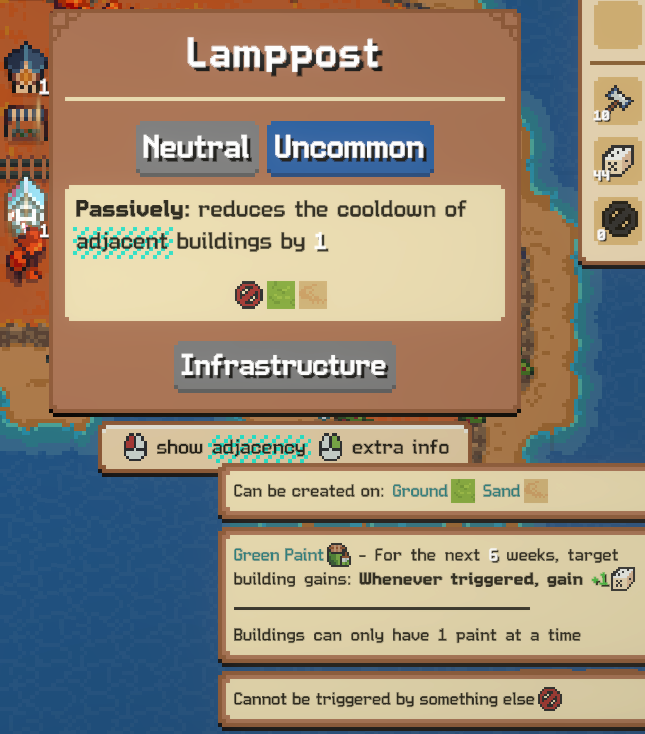
For Ghost Paint there is a second, quieter condition: the target’s effect must contain a category to rewrite. The paint guide’s counter-example is an effect that names a specific thing rather than a category, which gives Ghost nothing to change. Check the live card text for a category word before spending the paint. The deep worked example is the Ghost Marketplace engine.
Overwrites, Dark paint and dangerous new tags
- A legal new paint overwrites the old one. This is also the documented way to displace Dark paint: on higher difficulties buildings can arrive pre-painted with Dark, which the author describes as removing the building after a countdown — in their sample a starting building with an 8-week timer. Those exact numbers are one player’s record, not universal constants.
- Overwriting is destructive. You lose the old effect immediately. Before painting over a working engine piece, confirm the new effect pays at least as reliably, and remember a paint does not create a missing trigger source.
- Rainbow makes the building Wild — including to removers. The same guide warns that a Wild tag can make the building a legal target for resource-removal effects such as the Nitrary, and that going Wild costs the building its Council multiplier benefit in the author’s reading. Check what consumes Wild or Nature tags nearby before using Rainbow as a fix.
- No paint in reach? Keep the original engine. An unpainted chain that fires beats a painted plan you cannot assemble. The four-link chain check still decides whether anything works.
Paint interacts with reroll and guild plans rather than replacing them: see the herb engine for a chain paints can extend, and guild unlocks for the votes that bring paint sources into a run.
Paint behaviour above comes from KogasaGaSagasa’s All about Paints (posted Sep 16, updated Sep 19, 2026), read Oct 5, 2026, with interface support from curtaincall’s manual. The guide’s own uncertain exceptions are kept uncertain here; these are attributed records, not our current-client test.